
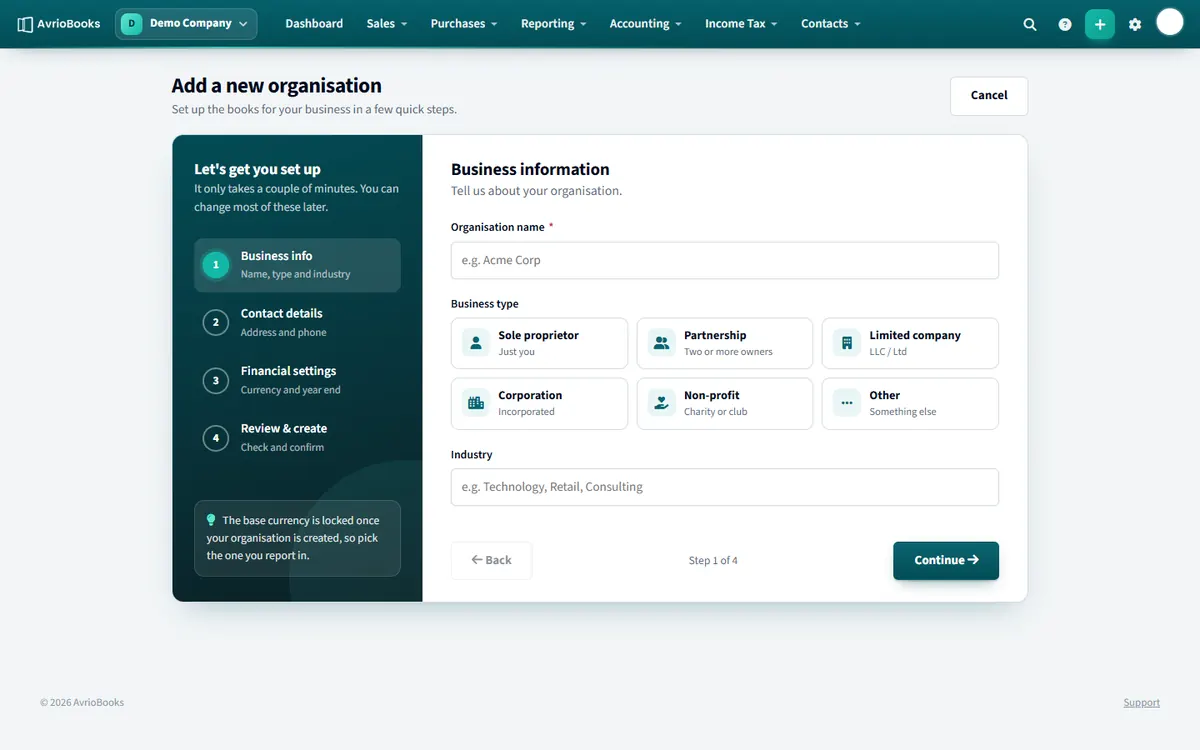
Set up a business
- After signing up you are taken to the setup wizard. To add another business later, open the business switcher at the top left and choose Add a new organisation.
- Business information: enter the organisation name, choose a business type (sole proprietorship, partnership, limited liability company, corporation, non-profit or other) and, if you like, an industry.
- Contact details: choose your country, then add your address and phone number. The country decides which default chart of accounts and tax rates are created.
- Financial settings: choose your base currency, your financial year end month and your accounting method.
- Review and create: check the summary and select Create organisation.
Accrual or cash basis?
| Method | Income and expenses are recorded |
|---|---|
| Accrual basis | When you issue the invoice or bill |
| Cash basis | When the money moves |
After you create it
- You become the business’s administrator.
- A chart of accounts and tax rates for your country are set up automatically. You can edit both later.
- Open Organisation profile from the business switcher to change details afterwards.
What to prepare before the wizard
- The name you want on invoices and reports.
- Your country, because it decides the default chart of accounts and tax rates.
- The currency you report in, and the month your financial year ends.
- Whether you account on an accrual or cash basis. If unsure, ask your accountant.
What you get automatically
Once you create the business, AvrioBooks sets up a chart of accounts and tax rates that suit your country, and makes you the administrator. You can start invoicing immediately, or first set your opening balances if you are moving from another system.
Business types
Choose the type that matches your legal form: sole proprietorship, partnership, limited liability company, corporation, non-profit or other. The type is descriptive and can be edited later from Organisation profile.
Next steps
Frequently asked questions
Can I change my base currency later?
No. The base currency cannot be changed after a business is created, so choose it carefully.
What is the difference between accrual and cash basis?
Accrual basis records income and expenses when you issue the invoice or bill. Cash basis records them when the money moves.
How many businesses can I create?
Starter allows 1, Standard 3 and Premium 10. The built-in demo company does not count.