
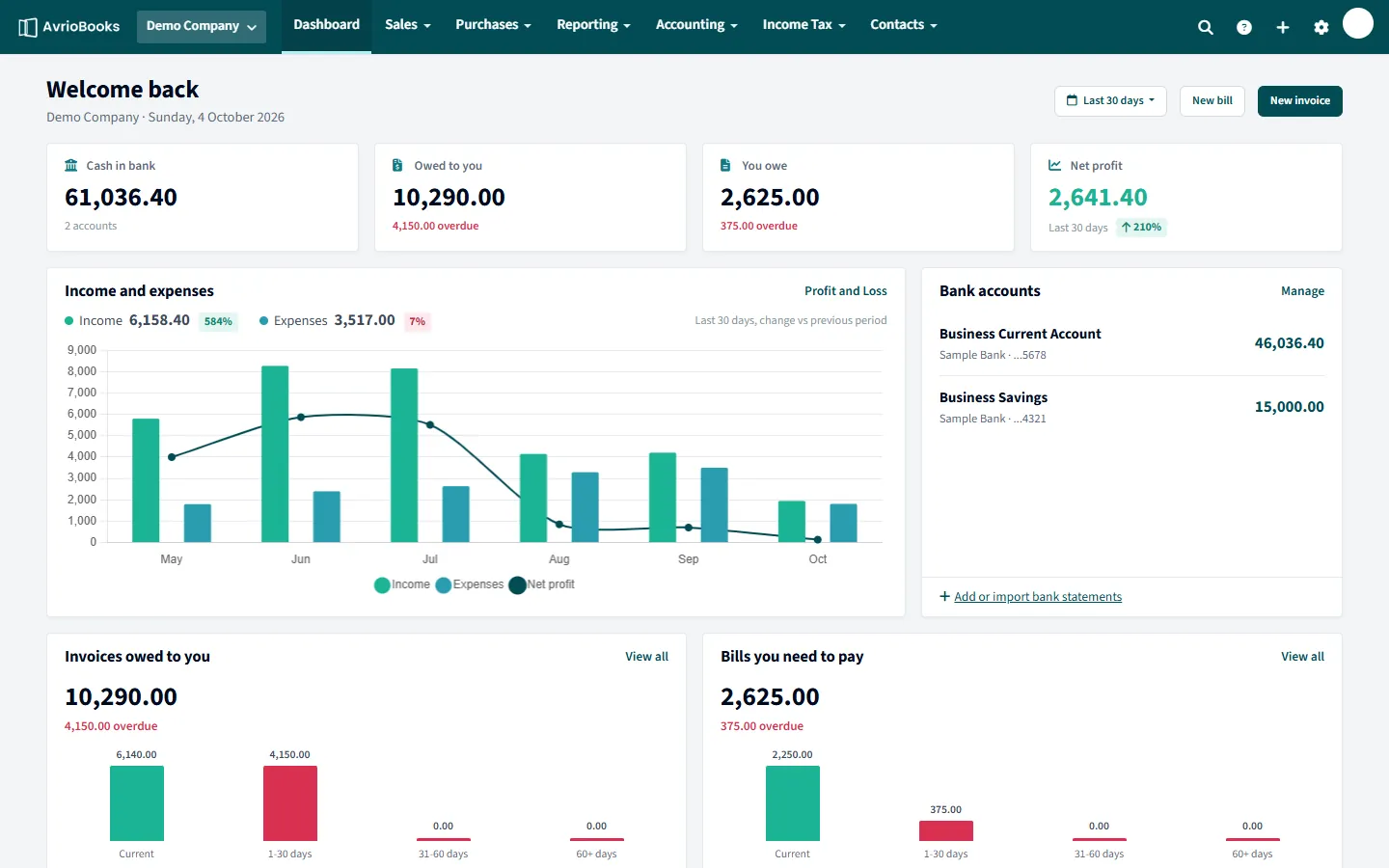
The summary cards
- Cash in bank: the combined balance of your bank accounts.
- Owed to you: unpaid customer invoices, with how much is overdue.
- You owe: unpaid supplier bills, with how much is overdue.
- Net profit: profit for the period you choose, with the change compared with the previous period.
Charts and lists
- Income and expenses: monthly bars with a net profit line. Use the period selector (for example Last 30 days) to change the range.
- Bank accounts: each account and its balance, with a link to add or import bank statements.
- Invoices owed to you and Bills you need to pay: totals grouped by how overdue they are.
The top menu
| Menu | What you find there |
|---|---|
| Sales | Invoices, awaiting approval, new invoice, customers, products and services |
| Purchases | Bills, awaiting approval, new bill, suppliers |
| Reporting | All reports, analytics and KPIs, cash flow forecast, report packs, scheduled reports |
| Accounting | Bank accounts, bank rules, manual journals, chart of accounts, tax rates, VAT/GST returns, fixed assets, inventory, budgets, segments, currencies, opening balances and accounting settings |
| Income Tax | Making Tax Digital dashboard, obligations, upload and mapping, history |
| Contacts | All contacts and contact groups |
The + button at the top right creates a new invoice, bill, manual journal or bank transaction from anywhere. Your profile menu holds Account security, Users & roles, the Audit log and Organisation settings.
Make the dashboard work for you
- Change the period on the chart to see this month, the last 30 days or a longer range.
- Use the View all links under each list to jump to the underlying invoices or bills.
- Use the New invoice and New bill buttons for the two most common jobs.
- Pin accounts to the watchlist to see the numbers you care about most.
Finding things quickly
The + button at the top right creates an invoice, bill, manual journal or bank transaction from any page, so you never need to go back to the dashboard first.
What you see depends on your role
Menus show the areas your role allows. If an item is missing, you may not have access to it. See Invite users and set roles.
A good daily routine
- Glance at Cash in bank, Owed to you and You owe.
- Clear anything in Expenses to review.
- Reconcile new bank lines.
- Chase overdue invoices from the list.
More in Getting Started
Still stuck? Our team is happy to help. Contact support or book a walkthrough.