
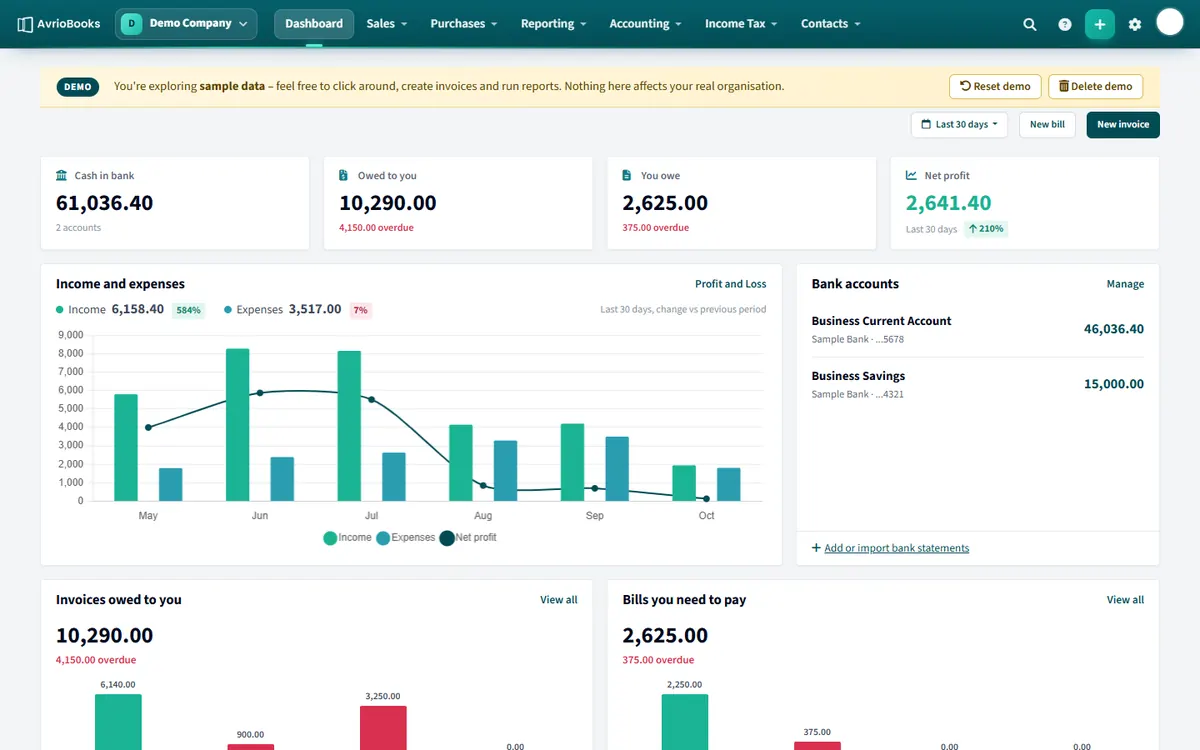
Open the demo company
- Select the business name at the top left to open the business switcher.
- Choose the Demo Company.
A DEMO banner at the top reminds you that you are looking at sample data: “Nothing here affects your real organisation”.
What you can try
- Create and edit invoices and bills.
- Reconcile the sample bank transactions.
- Run any report and export it.
- Look at budgets, analytics and the cash flow forecast.
Reset or delete it
- Reset demo puts the sample data back exactly as it was.
- Delete demo removes the demo company completely. You can add it again from the business switcher with Add demo organisation.
Things to try in 15 minutes
- Open the dashboard and see how the cards and charts reflect the sample data.
- Create an invoice for a sample customer and record a payment against it.
- Go to the bank account and reconcile a few lines, including one with the Create tab.
- Run the Profit and Loss and export it to Excel.
- Open Budget vs actual and the cash flow forecast.
- Look at Users & roles to see how permissions work.
Use it to train your team
Because the demo company is separate from your real books, it is a safe place to let new colleagues practise. When they are done, Reset demo puts everything back exactly as it was.
How it differs from your real business
- The data is fixed sample data; only the dates move so it always looks current.
- It is marked with a DEMO banner so you can never confuse it with real books.
- It does not count towards the number of businesses on your plan.
When you are ready, create your own business.
Frequently asked questions
Does the demo company affect my real books?
No. It is a separate sandbox with sample data, and nothing in it affects your real organisation.
Can I reset the demo company?
Yes. Select Reset demo to restore the sample data, or Delete demo to remove it and add it again later from the business switcher.
More in Getting Started
Still stuck? Our team is happy to help. Contact support or book a walkthrough.