
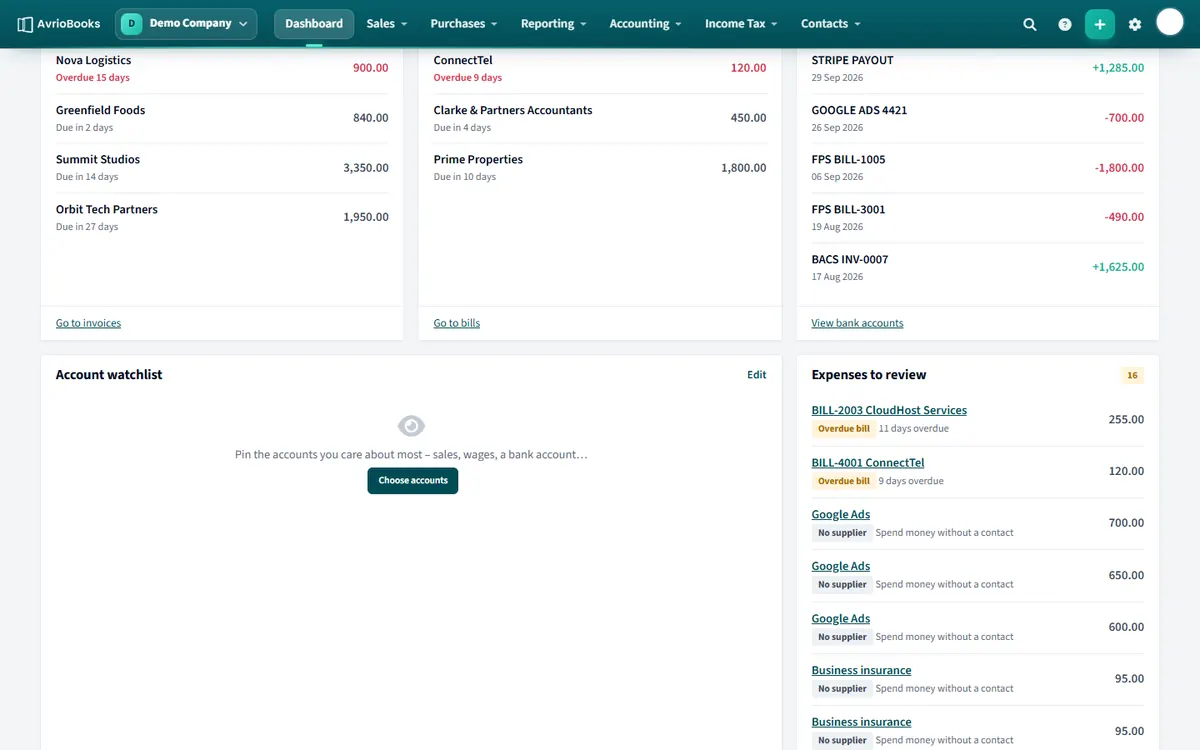
Account watchlist
Pin up to eight accounts, such as sales, wages or a bank account, to see how they are moving.
- On the dashboard find Account watchlist and select Choose accounts (or Edit if you already have some).
- Tick up to 8 accounts.
- Select Save.
For each account you see this month, last month, year to date, the same time last year and a six-month trend line. Select an account name to open its transactions for the year.
Expenses to review
This panel flags items that probably need action, with a count of how many there are:
- Overdue bills: unpaid bills past their due date.
- Draft bills: bills saved but not yet approved or posted.
- No supplier: recent spend-money transactions with no contact.
- No attachment: recent bills with no receipt or document attached.
Select an item to open it and fix it. When the list is empty you will see “Nothing needs your attention.”
What to put on your watchlist
- Sales or income accounts to see whether the current month is ahead of the same time last year.
- Wages or rent to keep an eye on large fixed costs.
- A bank account you want to monitor between reconciliations.
- A cost that has been creeping up, such as software subscriptions or travel.
The columns compare this month, last month, year to date and the same point last year, and the small trend line shows the last six months at a glance.
Clearing the review list
| Item | How to fix it |
|---|---|
| Overdue bill | Open it and record the payment, or agree a new date with the supplier |
| Draft bill | Check it and save it as a posted bill, or delete it if it is not needed |
| No supplier | Open the spend-money transaction and choose the contact |
| No attachment | Open the bill and attach the receipt or supplier invoice |
Working through the list each week keeps your books audit-ready and stops small gaps turning into month-end problems.
More in Getting Started
Still stuck? Our team is happy to help. Contact support or book a walkthrough.