
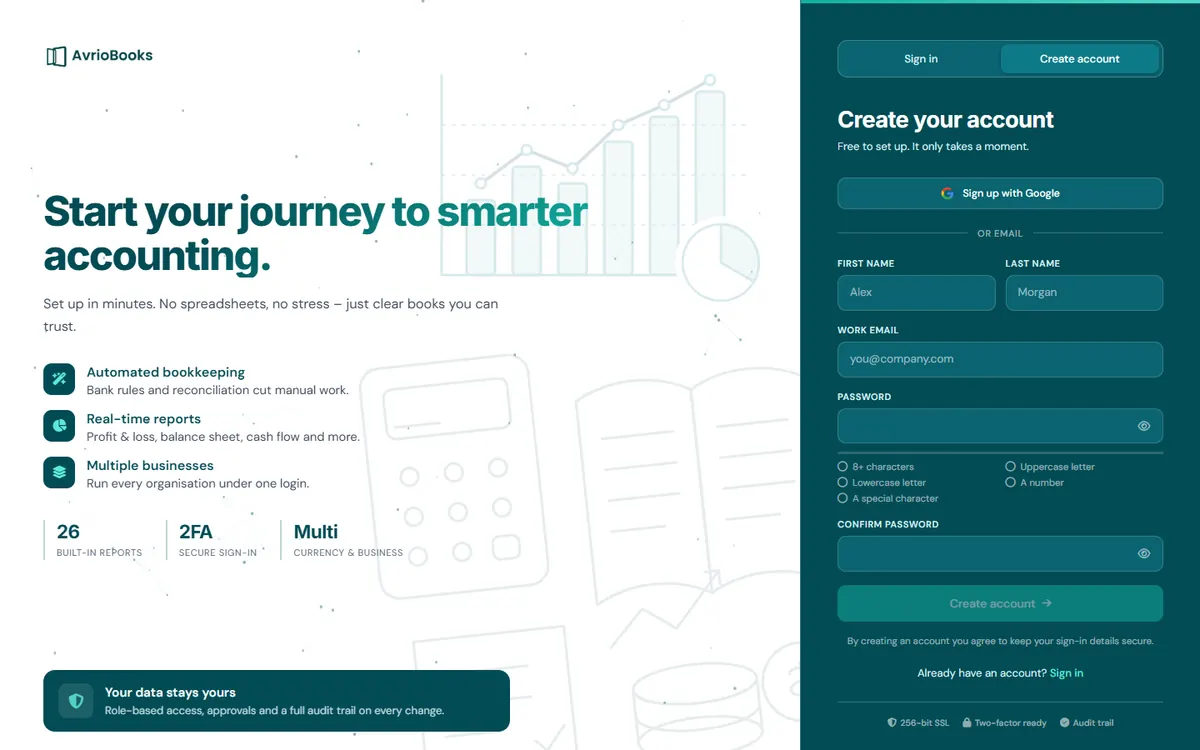
Sign up with email
- Go to app.avriobooks.com/signup.
- Enter your first name, last name and work email.
- Choose a password and type it again in Confirm password. Select the eye icon to check what you typed.
- Select Create account.
Sign up with Google
Select Continue with Google on the sign-in page and choose your Google account. You will not need a separate AvrioBooks password.
What happens next
After signing up you are asked to create your first business, which takes four short steps. See Create your business. Your first business also comes with a demo company full of sample data, so you can explore before you enter your own records.
Forgotten your password?
On the sign-in page select Forgot password?, enter your email address and follow the link we send you.
Before you start
- Use an email address you can open, because it is your sign-in and where password resets are sent.
- Choose a password that is long and unique. A passphrase of several words works well.
- Have your business details to hand: legal or trading name, country, base currency and the month your financial year ends.
Your first 30 minutes
- Create your business and choose your accounting method. See Create your business.
- Look around the demo company to get a feel for the screens. See Explore the demo company.
- Add your bank accounts and import a statement.
- Import contacts from a spreadsheet, or add them as you go.
- Create and email your first invoice.
Keep it secure from day one
Turn on two-factor authentication from Account security and save your backup codes somewhere safe. If you are inviting colleagues, give each of them their own sign-in rather than sharing yours.
What does it cost?
Nothing to start. Every business has a 30-day trial that includes everything in Premium and needs no card. See Choose or change your plan when you are ready.