
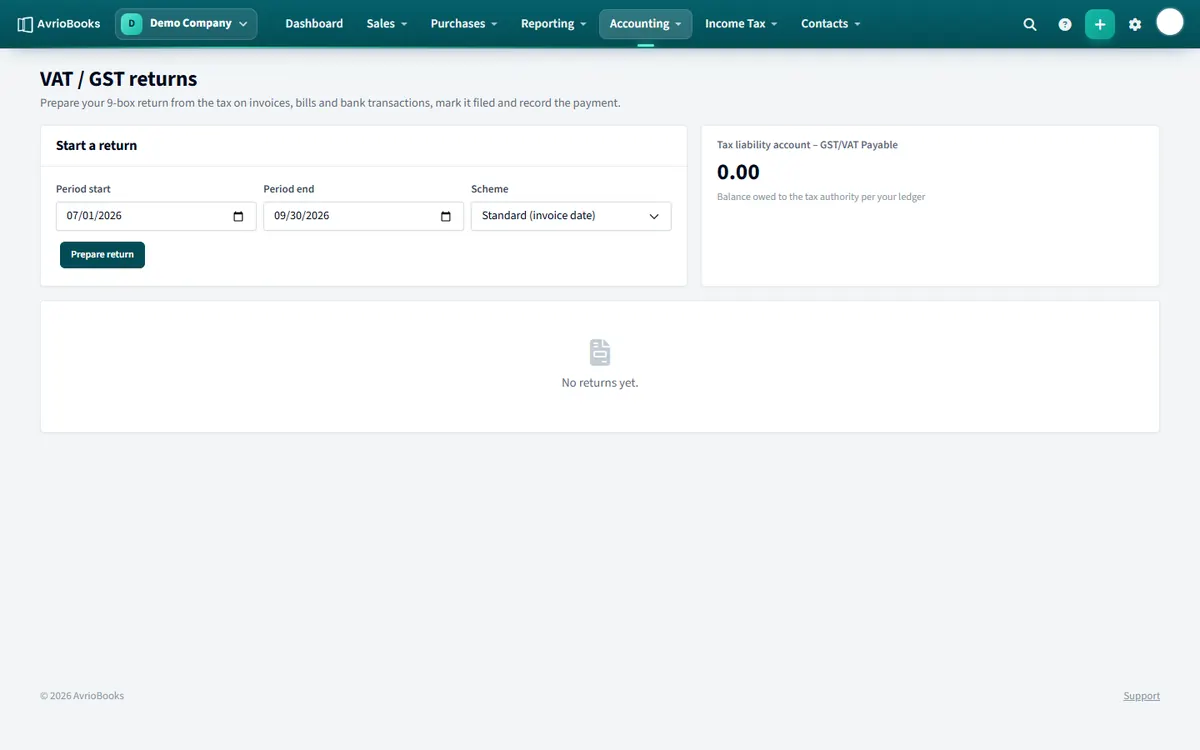
Prepare a return
- Select Accounting > VAT / GST returns.
- Under Start a return, choose the period start and period end.
- Choose the scheme: Standard (invoice date) or Cash accounting (payment date).
- Select Prepare return.
You see the nine boxes, including Box 5: net to pay or reclaim, with the list of transactions behind them. If transactions change after you prepare it, a message appears with a button to update the boxes.
File and pay
- Submit the figures on your tax authority’s portal.
- Back in AvrioBooks, select Mark return as filed, enter your submission reference if you have one, and confirm. The boxes are recalculated one last time and frozen. Filing cannot be undone.
- When you pay or receive a refund, record the payment against the return.
The nine boxes
| Box | What it holds | How AvrioBooks fills it |
|---|---|---|
| 1 | Tax due on sales | Tax on your sales invoices and receipts, less credit notes |
| 2 | Tax due on acquisitions | Set to zero |
| 3 | Total tax due | Box 1 plus Box 2 |
| 4 | Tax reclaimed on purchases | Tax on your bills and spend, less credit notes |
| 5 | Net tax to pay or reclaim | Box 3 minus Box 4. Positive means you pay; negative means you reclaim |
| 6 | Net sales | Total sales excluding tax |
| 7 | Net purchases | Total purchases excluding tax |
| 8, 9 | Supplies and acquisitions with other countries | Set to zero |
What is and is not included
Drafts and documents awaiting approval are left out, because they are not posted to your accounts. Credit notes reduce the figures. Foreign-currency documents are converted to your base currency. You cannot prepare a return whose period overlaps one you have already filed.
Standard or cash scheme?
Under Standard (invoice date) a document counts in the period of its invoice date. Under Cash accounting (payment date) only the part that has been paid within the period counts. Choose the scheme your tax authority has registered you for.
Frequently asked questions
Does AvrioBooks submit my VAT or GST return to the tax authority?
No. AvrioBooks prepares the nine-box figures and records filing and payment. You submit the return on your tax authority’s own portal.
What is the difference between the two schemes?
Standard (invoice date) uses the date of each invoice or bill. Cash accounting (payment date) uses the date of payment.
Which plan includes VAT and GST returns?
The Standard plan and above.